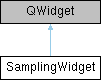
The SamplingWidget class is a graphical user interface to select and edit sampling algorithms and transforms. The algorithm settings can be modified using the QWidget provided by IAlgorithm::getSettingsWidget(). The transfrom settings can be modified using the QWidget provided by ITransform::getSettingsWidget(). The user can select algorithms provided by AlgorithmManager::instance and transforms provided by TransformManager::instance as well as define the image base. Image bases are:
More...
#include <samplingwidget.h>
|
|
void | sig_startSampling () |
| | [signal] sig_startSampling(...) is emitted on start sampling button pressed.
|
| |
| void | sig_enablePreviewChanged (bool enabled) |
| | [signal] sig_enablePreviewChanged(...) is emitted on enable preview checkbox state changed.
|
| |
| void | sig_resChanged (QString resolution) |
| | [signal] sig_resChanged(...) is emitted if the resolution in the combo box is changed
|
| |
|
| | SamplingWidget (QWidget *parent=nullptr) |
| | Creates a SamplingWidget with the title displayed up top and the algorithmList to select algorithms from. Returned indices refer to this algorithmList.
|
| |
| void | showPluginSettings (QWidget *settingsWidget) |
| | showAlgorithmSettings shows the given QWidget to the user.
|
| |
The SamplingWidget class is a graphical user interface to select and edit sampling algorithms and transforms. The algorithm settings can be modified using the QWidget provided by IAlgorithm::getSettingsWidget(). The transfrom settings can be modified using the QWidget provided by ITransform::getSettingsWidget(). The user can select algorithms provided by AlgorithmManager::instance and transforms provided by TransformManager::instance as well as define the image base. Image bases are:
- all images
- keyframes only
- all images (use boundaries)
- keyframes only (use boundaries)
The SamplingWidget provides signals on selected algorithm changed and start button pressed as well as selected transform changed.
- Author
- Dominik Wüst
- Date
- 2021/03/03
◆ SamplingWidget()
| SamplingWidget::SamplingWidget |
( |
QWidget * |
parent = nullptr | ) |
|
|
explicit |
Creates a SamplingWidget with the title displayed up top and the algorithmList to select algorithms from. Returned indices refer to this algorithmList.
- Parameters
-
| parent | The parent QWidget for this widget |
| title | Text to display up top |
| algorithmList | The algorithms the user can select |
| transformList | The transforms the user can select |
- See also
- IAlgorithm, ITransform
◆ showPluginSettings()
| void SamplingWidget::showPluginSettings |
( |
QWidget * |
settingsWidget | ) |
|
showAlgorithmSettings shows the given QWidget to the user.
- Parameters
-
| algoSettings | the QWidget to display |
◆ sig_enablePreviewChanged
| void SamplingWidget::sig_enablePreviewChanged |
( |
bool |
enabled | ) |
|
|
signal |
[signal] sig_enablePreviewChanged(...) is emitted on enable preview checkbox state changed.
- Parameters
-
| enabled | Is true if enable preview is checked, false otherwise. |
◆ sig_resChanged
| void SamplingWidget::sig_resChanged |
( |
QString |
resolution | ) |
|
|
signal |
[signal] sig_resChanged(...) is emitted if the resolution in the combo box is changed
- Parameters
-
| resolution | The selected resolution as a string |
The documentation for this class was generated from the following files:
- iVS3D/src/iVS3D-core/view/samplingwidget.h
- iVS3D/src/iVS3D-core/view/samplingwidget.cpp

 1.9.8
1.9.8